# 1 - Hyperviseur

# 1 - Proxmox

##### <span style="text-decoration: underline;">**Disque SSD :**</span> 128 ou 256 Go

#### [https://belginux.com/installer-proxmox/](https://belginux.com/installer-proxmox/)

Ajouter **Htop** :

<div id="bkmrk-apt-get-update"><div><div><div>```
<span role="presentation">apt-get update</span>
```

</div></div></div><div><svg height="16" viewbox="0 0 24 24" width="16" xmlns="http://www.w3.org/2000/svg"></svg></div></div><div id="bkmrk-apt-get-install-htop"><div><div>```
<span role="presentation">apt-get install htop</span>
```

</div></div></div>

# 2 - OMV - Open Media Vault

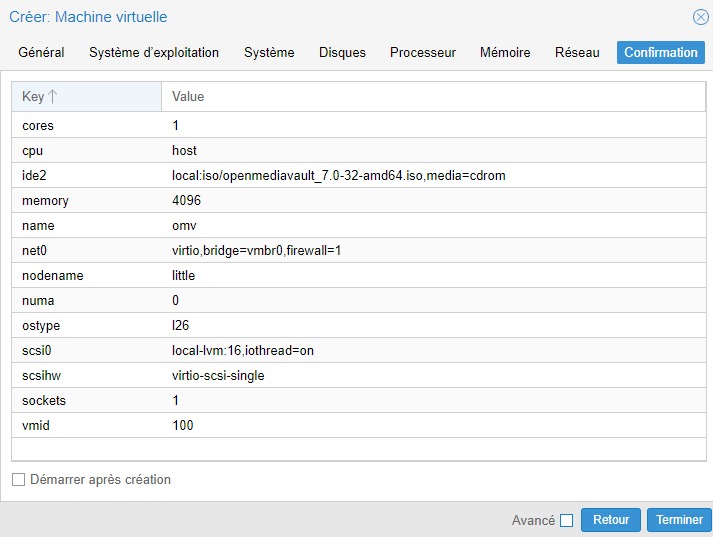
Faire une VM de 16 Go et 4 Go de RAM sur le disque Proxmox :

[![image-1734975691722.25.17_c5fa54f6.jpg](https://doc.team-yvl.com/uploads/images/gallery/2024-12/scaled-1680-/nOLcQZghcZXb4CQM-image-1734975691722-25-17-c5fa54f6.jpg)](https://doc.team-yvl.com/uploads/images/gallery/2024-12/nOLcQZghcZXb4CQM-image-1734975691722-25-17-c5fa54f6.jpg)
Une fois la VM montée, cocher le lancement au démarrage du PVE.

Ce rendre au shell et installer OMV.